Source analysis · Reviewable evidence

Find the risk.
Read the evidence.

Scan your repository for security risks with AI. Inspect source references and the reasoning behind each finding, then track the review and remediation.

Inside the review

Follow the call.
Inspect the control.

Synthetic example · not a scan result
example/routes/notes.tsSource
export async function readNote(request, services) {
  const actor = await services.session.actor(request);
  const noteId = request.params.noteId;
  await services.access.requireReader(actor, noteId);
  return services.notes.readVisible(actor.id, noteId);
}
Identity resolutionexample/security/session.ts
Source observation

The route passes an actor and the requested note identifier into an access check.

Model interpretation

Identity appears relevant to this operation. The session resolver’s failure behavior must also be inspected.
Continue the review

Follow the identity resolver before judging the route.

example/security/access.tsSource
export async function requireReader(actor, noteId) {
  const allowed = await grants.canRead(actor.id, noteId);
  if (!allowed) {
    throw new AccessDenied();
  }
}
Permission lookupexample/security/grants.ts
Source observation

This helper checks a grant and throws when that grant is absent.

Model interpretation

A permission boundary is visible here. Its coverage still depends on the caller and the grant lookup.

Continue the review

Check which routes call this helper and how grants are scoped.

example/repositories/notes.tsSource
export async function readVisible(actorId, noteId) {
  return storage.findNote({
    noteId,
    readerId: actorId,
    visibility: "shared-with-reader"
  });
}
Query implementationexample/storage/adapter.ts
Source observation

The storage call receives the reader identity together with the note identifier.

Model interpretation

These arguments express an access constraint. The storage adapter determines how that constraint is applied.

Continue the review

Inspect the adapter rather than treating the method name as proof.

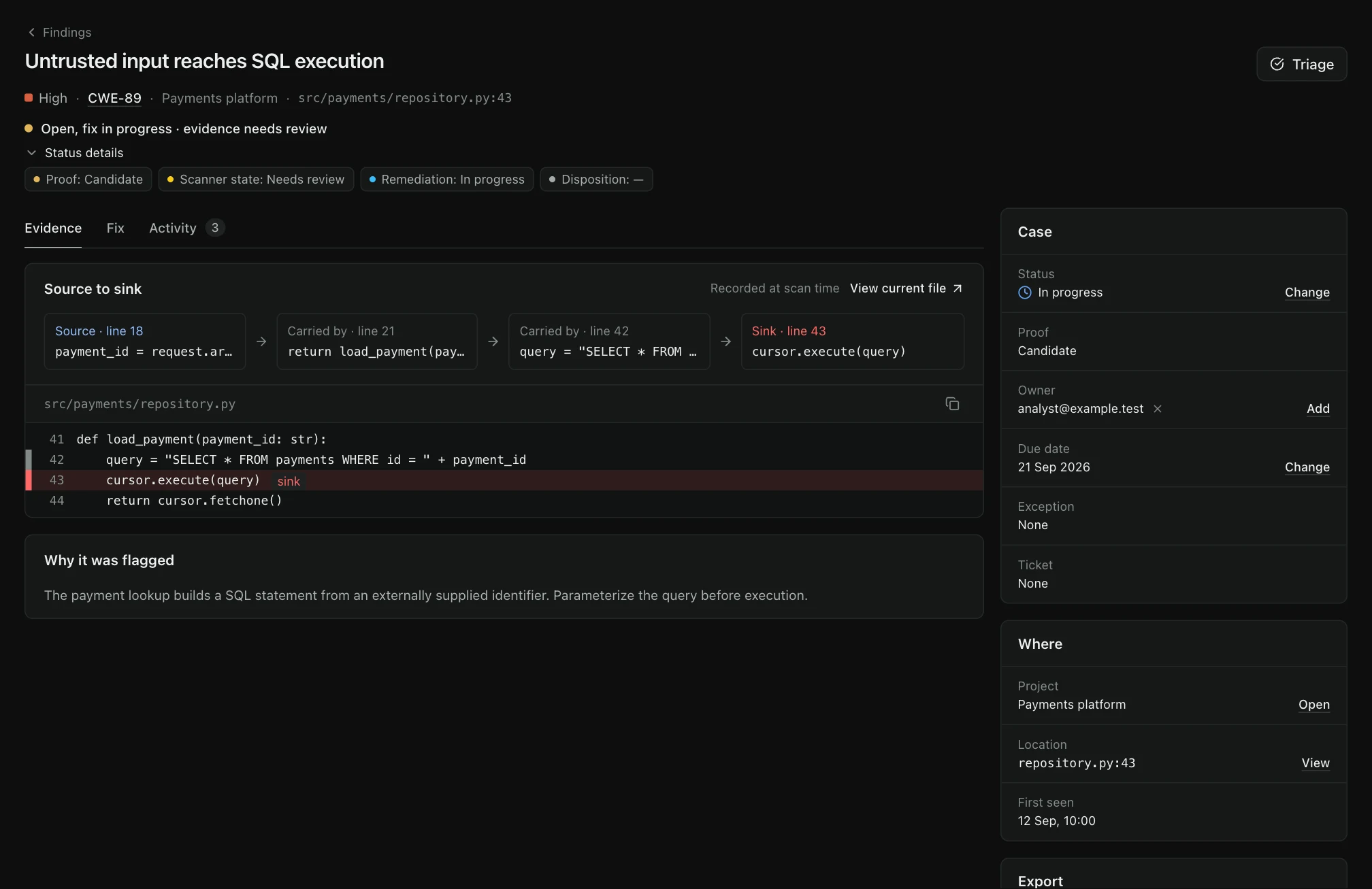
TraceMint AI Code Security workspace with illustrative project data.
TraceMint interfaceIllustrative demo dataView full size — opens image in a new tab↗
Inside the scanner

Security-trained models.
Infrastructure you choose.

TraceMint fine-tunes Qwen- and Devstral-based models for code security and offensive testing. A security-focused model is part of the engine—not a requirement to send your code to a third-party AI service.

TraceMint / Security model familyQwen · Devstral
27B1T

A range of model configurations—not a single hardware requirement.

Local inference. No third-party LLM API required.

Deploy the model and runtime alongside TraceMint in your own environment. Model weights, runtime dependencies and integrations form part of the offline deployment plan.

No GPU in your environment? Explore hosted inference
Internal evaluation scope~800open-source repositories

Evaluate the engine on security work.

Alongside the model, evaluate source context, review quality and the resulting findings. Compare a selected configuration against your own repositories and acceptance criteria.

About this evaluation

The repository count is TraceMint’s reported internal evaluation scope. A benchmark report, comparative scores and methodology are not published here. It is not an independent certification or a guarantee of performance on your code.

Discuss your model evaluation
Languages & frameworks

Bring your stack.
Choose your model.

Work with models trained on code across languages and frameworks. A model's language knowledge and the files included in a TraceMint scan are two different things.

The model

Multilingual understanding

Language and framework knowledge varies by model and version. It can extend beyond the scanner's configured file types.

The scan

Explicit source coverage

File discovery, configured languages and exclusions determine what reaches the model. Review the recorded scope for your repository.

View current source-file coverage

A scan scope, not a model limit. This list describes TraceMint's current source-file support, not every language its underlying models may understand. These are the languages registered in the current source-scan configuration.

  • JavaScript
  • TypeScript
  • Python
  • C#
  • Java
  • Rust
  • PHP
  • Ruby
  • Go
  • C
  • C++
  • Swift

C# covers C# source in .NET projects, not every .NET language. Android Java source is covered as Java; Android packages are not a separate supported source language. Language selection, file-size limits and exclusions affect what is analyzed. Automatic detection can omit a language represented by only one file in a mixed repository; select that language explicitly with the CLI --lang option or the deployment language setting when needed. Review the recorded scope and omissions rather than assuming every file was scanned. Finding quality should be evaluated with your configured model and representative code.

Another language or framework? Let's review your coverage. Evaluate the model and scan configuration against representative code.

How it fits your workflow

Scan the repository.
Review the finding.

01 / AI Code Security

Start with your repository

Connect an SCM repository or upload a source archive. Choose Fast, Balanced or Deep analysis and the vulnerability categories for the project. Language scope follows the CLI or installation configuration.

02 / AI Code Security

Inspect the source evidence

Review the relevant code and the explanation behind a finding. Keep source evidence distinct from a model’s assessment.

03 / AI Code Security

Record the decision

Confirm, investigate or dismiss with a recorded reason. Hand the issue to the right person and follow its progress.

AI Code Security / Capabilities

Analysis depth.
Evidence. Follow-through.

In focus

Three depths of analysis

Fast uses a tighter, single-pass analysis budget with judge review. Balanced adds rescue and verifier review. Deep uses broader, multi-pass analysis. Choose the trade-off for your workload; mode names are not fixed runtime guarantees.

Evidence you can inspect

Read the source location and captured excerpt alongside the analysis. Check what the evidence supports and what still needs investigation.

From finding to follow-through

Assign an owner and due date, track remediation on the board, and compare new and fixed findings between compatible scans. When git attribution is enabled and history is available, inspect introduced-in evidence or a last-change fallback—not an automatic assignment or a judgment of responsibility.

Business logic has its own questions

Use the Business Logic workspace to review workflow, authorization and transaction-risk signals. Available checks, scenario candidates and guarded replay results are separate evidence; a candidate is not a confirmed exploit.

Propose a fix. Review it before release.

For a confirmed finding with available source, generate a fix suggestion, prepare a local git review branch and rescan it. The supported GitHub / GitHub Enterprise publication flow can open a pull request after an explicit action; it does not automatically merge changes or guarantee a correct fix.

A model choice that fits

Evaluate the supported model and deployment configuration against your codebase. Model size is a choice; quality and runtime need to be measured for the workload.

A place for human judgment

AI assessment is not the same as independent confirmation. Review signals, uncertainty and operator decisions retain their own meaning.

Before you evaluate.

Which languages and models can I use?

The language-support section lists the source languages accepted by the scan workflow. Configure a supported model endpoint and evaluate quality and runtime with representative code. Language admission does not establish equal accuracy across languages or model sizes.

Does a finding mean an exploit was reproduced?

No. Source analysis, AI review and an independently reproduced exploit are different forms of evidence. The workflow keeps that distinction visible.

Plan your evaluation

See AI Code Security
in your workflow.

Tell us what you want to evaluate. Our team will review your request and contact you to agree the scope and arrange a time.

Request a demo