Keep credentials out of code

Secrets belong
outside your code.

Bring secret scanning into the security review workflow. See the scope, inspect masked findings and keep a record of scans without putting the credential back on display.

Exposure → record → response

Find the trace.
Keep the secret out.

Illustrative workflow

SEC / 01

The location matters. The value stays masked.

Source location

config/service.py line 18

service_url = "https://service.example"service_token = "[REDACTED]"timeout_seconds = 30
Credential value[REDACTED]

Carry the reference forward.
Leave the credential behind.

Inspection note

A useful finding
without a live credential.

Project
Billing service
Reported location
config/service.py:18
Review
Credential-like value

Inspect the finding and its source location. Keep sensitive values out of tickets, screenshots and handoffs.

SEC / 02

A result needs a scope and a point in time.

Source location

config/service.py line 18

service_url = "https://service.example"service_token = "[REDACTED]"timeout_seconds = 30
Credential value[REDACTED]

Carry the reference forward.
Leave the credential behind.

Scan ledger
14 SEP

Project source scan

2026-09-14 · 09:40 UTC

Project
Billing service
Evaluated scope
Uploaded source archive
Recorded result
Finding available for review

Return to the recorded scan after the session ends. Unevaluated scope is not a clean result.

SEC / 03

Keep the credential owner in the loop.

Source location

config/service.py line 18

service_url = "https://service.example"service_token = "[REDACTED]"timeout_seconds = 30
Credential value[REDACTED]

Carry the reference forward.
Leave the credential behind.

Response handoff

A detection starts
the owner’s response.

  1. Assess the exposureReview where the value appeared.
  2. Coordinate with the ownerUse the existing credential process.
  3. Review the next scanRevisit the recorded project scope.

Revocation or rotation belongs to the credential response process. Detection alone does not rotate a secret.

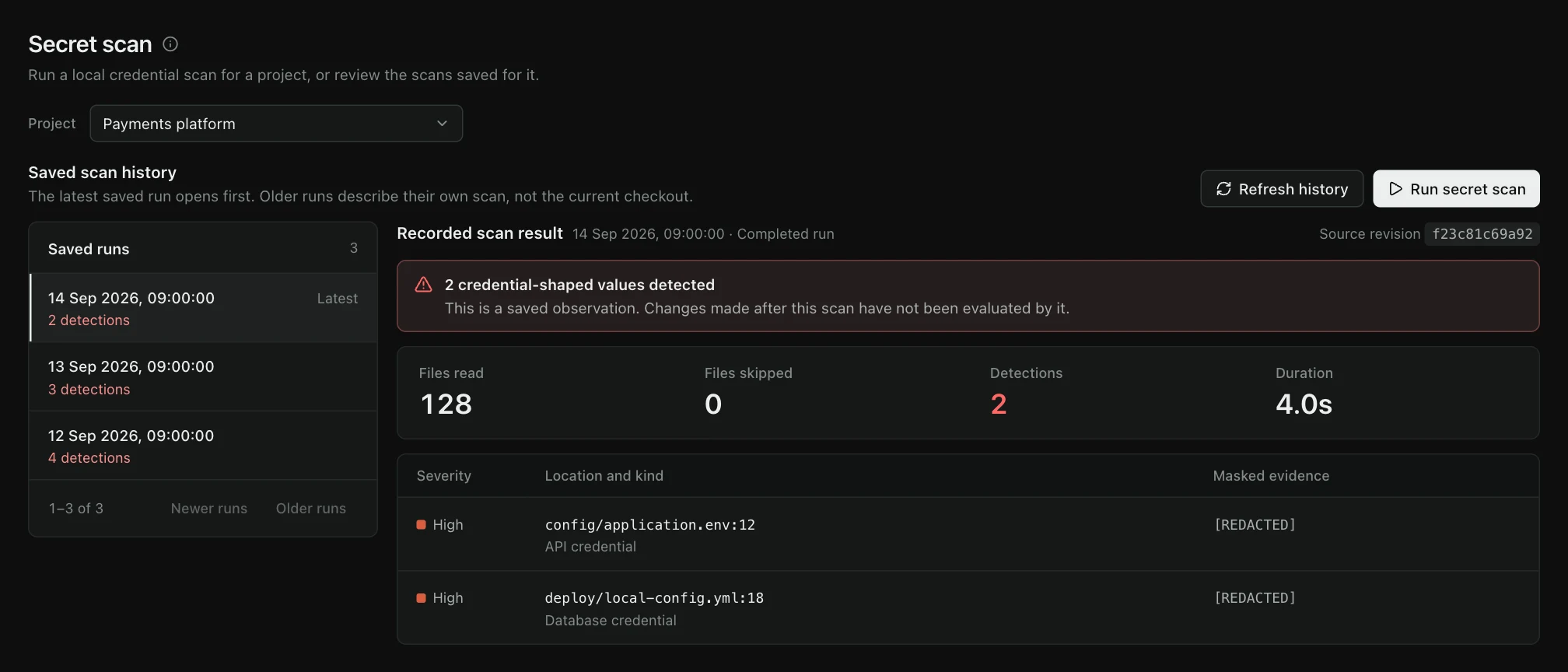
TraceMint Secret Scanning workspace with illustrative project data.
TraceMint interfaceIllustrative demo dataView full size — opens image in a new tab↗
How it fits your workflow

Find the exposure.
Coordinate the response.

01 / Secret Scanning

Choose the project

Request a scan for the intended project and review the checkout, evaluated scope, skipped files and completion state behind the result.

02 / Secret Scanning

Inspect without exposing

Review the finding and its location with sensitive values masked. Avoid moving credentials into tickets or screenshots.

03 / Secret Scanning

Follow the response

Assess the finding and coordinate the appropriate revocation or rotation through your existing credential process.

Evaluation brief / Secret scanning

Know what was inspected.
Plan what happens next.

A useful secret-scanning evaluation covers the scan boundary, the handling of sensitive evidence, the retained record and the response owned outside the scanner.

Coverage / 01

What did this run actually inspect?

Read the selected project, run status and evaluated scope together. A scan that was never requested, did not finish or omitted files is not a clean result.

Starting point
An explicitly selected project
Record to review
Run time, completion and evaluated scope
Status rule
Unknown or incomplete stays distinct from clean
Decision boundary

Current project scanning does not by itself promise an exhaustive search of every historical Git commit.

Acceptance check

Use a representative repository containing the file types, generated paths and exclusions that matter to your team.

Evidence / 02

Can the team investigate without spreading the credential?

The review needs a useful location and classification while the sensitive value remains masked in the persisted evidence and interface.

Visible context
Project, file location and detection type
Sensitive value
Masked rather than replayed in the UI
Handoff practice
Do not copy raw values into tickets or screenshots
Decision boundary

A pattern match does not prove that a credential is currently valid, active or reachable from the affected environment.

Acceptance check

Confirm that screenshots, exports and downstream ticket workflows preserve the masking expected by your organization.

Record / 03

Will the result still make sense after the browser closes?

Saved runs are scoped to the organization and project, so a later reviewer can distinguish the latest result from an earlier scan.

Persistence
Recorded run history beyond the current session
Isolation
Organization- and project-scoped retrieval
Freshness
Each result retains its own run time and state
Decision boundary

Retention periods, backups and deletion behavior depend on the agreed deployment and operating policy.

Acceptance check

Agree how long evidence must remain available and who is allowed to read project-level scan history.

Response / 04

Who revokes, rotates and validates the replacement?

Detection begins the response. The credential owner still needs to revoke or rotate it, update dependent systems and verify that the old value no longer works.

TraceMint role
Detection, review context and retained finding
Credential owner
Revocation, rotation and dependency updates
Closure evidence
A new scan plus provider-side confirmation where required
Decision boundary

TraceMint does not imply automatic rotation merely because it found a credential-shaped value.

Acceptance check

Choose one real credential class and document the complete response path before production rollout.

Bring to the evaluation
  • A representative repository
  • Your exclusion policy
  • One credential-response runbook
Secret Scanning / Capabilities

Masked findings.
A retained scan history.

In focus

Scan history matters

A recorded result should remain useful after the session ends. Review the scan history and the time behind the latest result.

Unknown is not clean

A project that has not been evaluated does not have a clean secret posture. Scope and incomplete results stay visible.

Detection is one step

A detected credential still requires a response. Automatic rotation is not implied by finding a secret.

Before you evaluate.

Does TraceMint rotate the secret for us?

Secret detection and provider-side credential rotation are separate actions. Plan revocation and rotation with the owner of the affected credential.

Will the website demo show real secrets?

No. Product walkthroughs use illustrative data and masked values, never a customer’s live credential.

Does scan history mean every Git commit was searched?

No. It is the retained history of requested project scans. Read each result against the checkout, evaluated scope and time it records; arbitrary historical Git commit coverage is not implied.

When does zero findings mean clean?

Only when the project checkout was available and the requested scan completed its declared scope. An unavailable checkout, skipped or truncated scope, or a failed run remains incomplete rather than clean.

Does a detection prove the credential is active?

No. Detection identifies credential-shaped material and records its masked location. Provider validity, exposure impact, revocation and rotation are separate response steps.

Plan your evaluation

See Secret Scanning
in your workflow.

Tell us what you want to evaluate. Our team will review your request and contact you to agree the scope and arrange a time.

Request a demo