Keep the scanner. Improve the review.

Your SAST findings.
A fresh perspective.

Large SAST reports can contain hundreds or thousands of false positives. TraceMint autonomously reviews findings in the configured scope, using available source context to distinguish likely false positives from issues that need attention.

The review folio

Keep the evidence.
Separate the decisions.

Illustrative workflow

Original report

01 / 03
Scanner-reported concern

Potential missing authorization

The report points to the invoice handler. That report is the starting evidence, not the outcome of the review.

Input
Supported SAST report
Reported severity
High
Reported location
routes/invoices.ts:42

Import into the intended project. Keep each artifact’s scan and review session identifiable.

Source context

02 / 03
Handler excerpt
async function getInvoice(request) {
  const invoice = await loadInvoice(request.params.id);
  return renderInvoice(invoice);
}

routes/invoices.ts · source context

Questions beyond this excerpt
  1. Route registrationWhere is the handler attached?
  2. Authorization boundaryWhich middleware checks this request?
  3. Object accessWho may read the requested invoice?

Available context supports the review. A missing check in this excerpt alone does not prove missing authorization.

Recorded decision

03 / 03
Evidence assessment

Further context
needed.

The route-level authorization boundary is not established by the recorded excerpt.

Not independently verified
Risk-acceptance record
Reason
Time-bound review of the internal endpoint.
Requested by
Application owner
Approved by
Risk reviewer
Expiry
14 October 2026

An approved exception records a governance decision. It does not verify or disprove the underlying vulnerability.

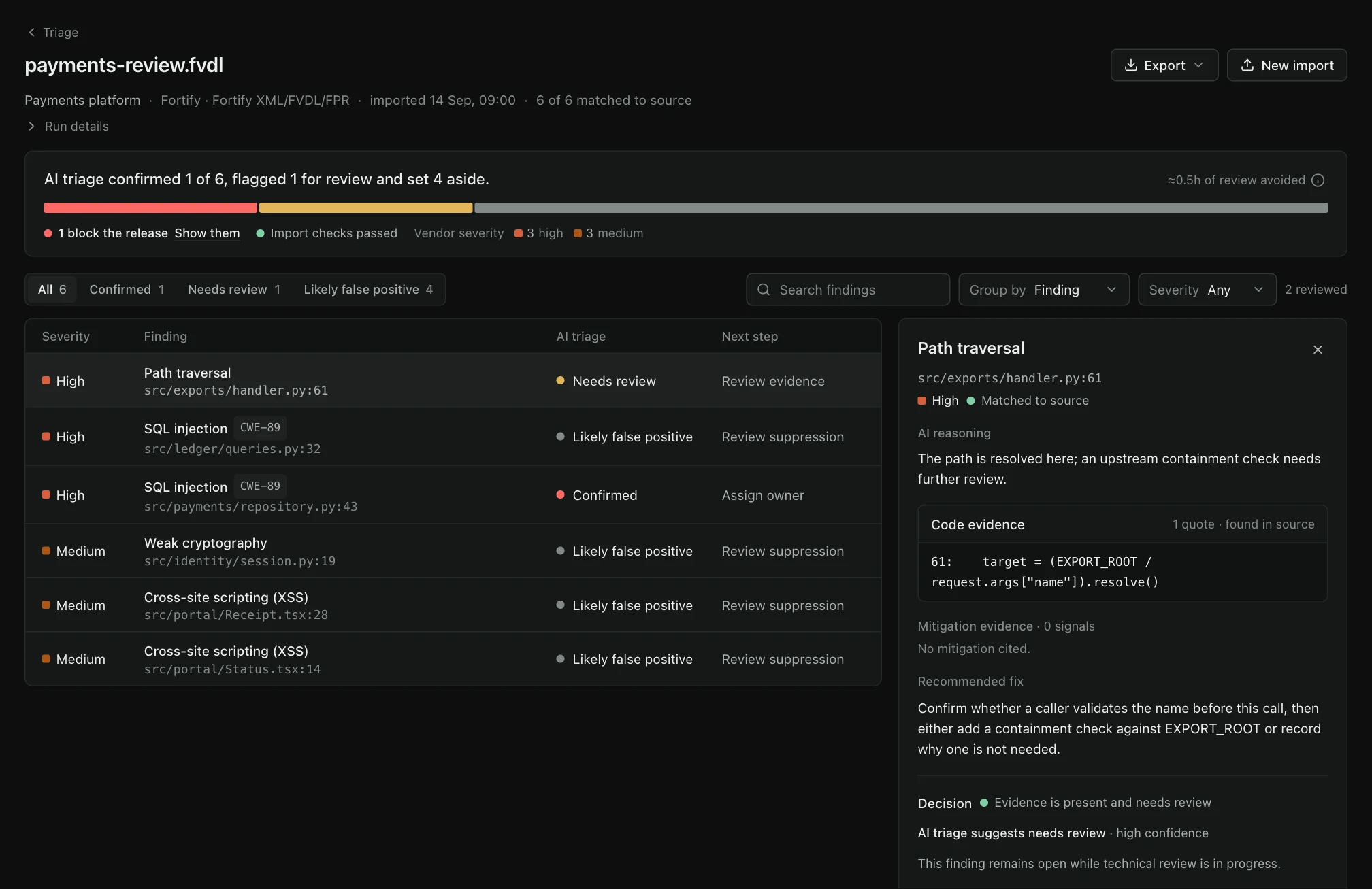
TraceMint Autonomous Triage workspace with illustrative project data.
TraceMint interfaceIllustrative demo dataView full size — opens image in a new tab↗
How it fits your workflow

Import the report.
Review the assessment.

01 / Autonomous Triage

Bring the report

Select the project whose source matches the scanner run, then upload a supported Checkmarx, Fortify, SARIF or CSV report. TraceMint detects the supported format and records how reported paths resolve against that source.

02 / Autonomous Triage

Let the review run

After setup, TraceMint runs the AI review autonomously, without an analyst steering each finding. It records the rationale, available evidence and anything that remains unresolved.

03 / Autonomous Triage

Act with a record

Inspect the outcome and rationale. Confirm, mark a false positive or follow the remediation workflow with a recorded decision.

Evaluation brief / Autonomous triage

Keep the scanner.
Measure the review.

The useful evaluation is not a polished verdict count. It measures import fidelity, available source context, explainable outcomes and the human decisions retained after the autonomous review.

Import / 01

Does the report arrive with the fields the review needs?

Validate the exact customer export—not only its filename—so locations, rules, severity and available flow information map into the intended project.

Report families
SARIF, Checkmarx, Fortify and supported CSV
Batch behavior
Each artifact receives its own scan and review session
Operational queue
Selected reports are uploaded one at a time
Decision boundary

File import does not create a native connector, webhook or scheduled synchronization with the report producer.

Acceptance check

Bring representative exports from the exact scanner edition and configuration you intend to use.

Source context / 02

Can the reported location be connected to the right code?

The report begins the review. Source availability, path alignment and surrounding controls determine what the model can establish beyond the scanner’s statement.

Starting evidence
Scanner rule, location and available flow
Review context
Relevant source and surrounding control boundaries
Gap handling
Missing or ambiguous context remains unresolved
Decision boundary

A scanner location or a missing check in one excerpt is not, by itself, independent confirmation of a vulnerability.

Acceptance check

Include findings with moved paths, generated sources and cross-file controls to test context alignment honestly.

Outcome / 03

Can the team understand why a finding changed priority?

Keep AI-supported findings, likely false positives and results needing more evidence distinct, with rationale and source references available for inspection.

Assessment
Recorded rationale and available supporting evidence
Uncertainty
Needs-more-context remains a valid outcome
Operator decision
Confirm, mark false positive or continue remediation
Decision boundary

Autonomous review is not a promise that every false positive will be eliminated, every result confirmed or every model will perform identically.

Acceptance check

Score a labelled sample with true positives, false positives and deliberately incomplete context before scaling the queue.

Governance / 04

What happens after the review?

Assignment, remediation and time-bound exceptions remain human governance actions with their own records; the model does not approve its own risk acceptance.

Remediation
Owner, status and follow-through
Exception
Reason, separate approver and required expiry
Auditability
Decision history remains distinct from model evidence
Decision boundary

An approved exception records accepted risk; it neither disproves the finding nor silently turns it into a fix.

Acceptance check

Walk one finding through remediation and another through an expiring exception with the roles used by your organization.

Bring to the evaluation
  • Representative native exports
  • Matching source at the reviewed revision
  • A labelled acceptance sample
Autonomous Triage / Capabilities

Autonomous review.
Decisions you can inspect.

In focus

Move the manual queue out of the way

Checking a large report finding by finding can consume hours or person-days. Within the configured review budget, TraceMint runs without an analyst steering each finding. Total, reviewed and untriaged counts remain visible so work outside the budget is not silently presented as reviewed.

Keep Checkmarx, Fortify and your other scanners

Import Checkmarx CSV or XML, Fortify XML, FVDL or FPR, SARIF, and generic CSV with supported vulnerability columns. Report import adds a review layer to the tooling you already use; it does not require replacing the original scanner.

Several reports. One project.

Select several reports for the same project and follow each import’s progress and result. The upload queue processes one report at a time, with a separate scan and review session for each artifact.

Autonomy with visible boundaries

A likely false positive, an AI-supported finding and a result needing more evidence remain distinct. Source availability and configured review limits stay visible; autonomy is not a promise that every finding can be resolved or every false positive eliminated.

The report and source must describe the same code

Source-match counts distinguish exact, suffix, ambiguous, missing and refused paths. A low match rate can indicate the wrong checkout; deployment policy can leave findings imported while withholding AI triage.

Three outcomes, three obligations

Confirmed requires supporting source evidence. A likely false positive retains the mitigating or contrary evidence. Needs context keeps the item in the queue when source, configuration or helper-chain evidence is insufficient; the vendor result remains visible beside the TraceMint assessment.

Risk acceptance is a decision

Your team keeps control of remediation and risk acceptance. Where an exception is appropriate, retain the rationale, human approval and expiry in the supported governance workflow. AI review does not grant its own exception.

Report imports

Bring the report.
Connect the source.

Import these report formats into the intended project. Exact export layout, source availability and field mapping determine what the review can establish; file import is not the same as a live connection to every scanner that produces the format.

Review integration workflows
Risk & remediation

A decision deserves
a defensible record.

Assign remediation, track the finding, and preserve the reason behind an exception. A risk acceptance is an explicit decision—not a finding quietly disappearing.

The exception workflow captures a rationale and category, a separate approver, a required expiry and an audit history. Track accepted risks separately from resolved findings, and review the configured audit-integrity scope in your evaluation.

Walk through an exception

Before you evaluate.

Is importing a report the same as a live integration?

No. File import, connector synchronization, webhooks and scheduled execution are separate capabilities. Configure the report and source workflow you need without assuming that import also enables a live connection.

Which SAST reports can we start with?

Checkmarx CSV/XML, Fortify XML/FVDL/FPR, SARIF and generic CSV with supported vulnerability columns. SARIF paths include CodeQL, Semgrep, Checkmarx SAST, ESLint, Bandit and SpotBugs exports. Bring the supported export and relevant source context; a native scanner connection is not required for file import.

Does an analyst need to review each finding before the AI can continue?

No. Once the report, source context and scope are configured, the AI review runs autonomously. Your team inspects the results and handles unresolved evidence, remediation and exception approvals. Review time and false-positive reduction depend on the report, source coverage and model—not a guaranteed savings figure.

Does reviewer feedback retrain the running model?

No. Labels and adjudication are retained for governance and can support a separately governed offline improvement process. A reviewer action does not silently change the behavior of the next scan.

How should we measure an evaluation?

Start with a representative labelled subset. Measure source-match rate, confirmed-finding retention, false-positive reduction, precision and needs-context rate separately. Estimated analyst time saved is an assumption unless your evaluation measures actual effort.

Plan your evaluation

See Autonomous Triage
in your workflow.

Tell us what you want to evaluate. Our team will review your request and contact you to agree the scope and arrange a time.

Request a demo