
Atlas Notes
Application landscapeWeb client
Request
Application boundary
Application APIRoutes · policies · services
Background work
Job runnerBackground processing
Repository access
Notes store
Explore an AI-generated view of your application architecture. Move between scopes, inspect components and follow the evidence behind the relationships.
readVisible(actorId, noteId)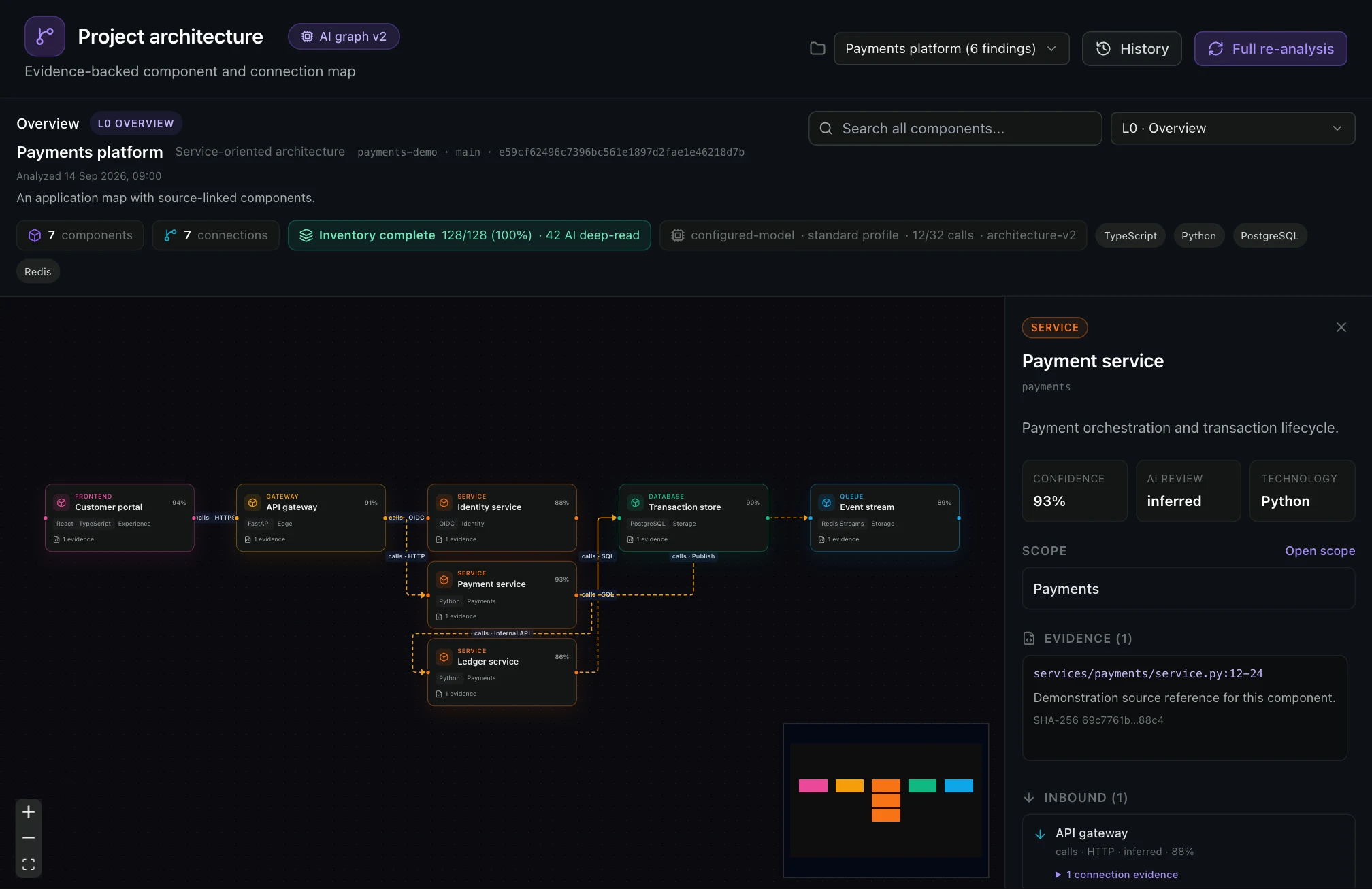
Bind the analysis to the intended source and get an application-level view without treating thousands of individual files as equally important architecture nodes.
Navigate the component hierarchy to investigate the part of the system that matters.
Review component details, source references and the uncertainty in inferred relationships.
Architecture analysis is an AI interpretation of a particular source snapshot. The evaluation should test navigation at repository scale and the evidence behind the relationships—not only the visual diagram.
Move from the system view into an application scope and then a component, using hierarchy to keep thousands of files from competing as equal nodes.
The navigation model is designed to reduce visual complexity; it is not a fixed runtime SLA for repositories of every size.
Use a representative monorepo or multi-service repository and confirm that the scopes match how your engineers discuss the system.
Open a component or edge and inspect its source reference, observed code and the model’s interpretation as separate layers.
A source reference supports an inference; it does not convert every architectural edge into a deterministic fact.
Sample important and surprising relationships with a developer who knows the codebase, including at least one rejected inference.
Confidence and review signals should help prioritize inspection. Missing context and uncertain relationships must remain visible rather than being drawn with false certainty.
Confidence is not a probability that the whole architecture is correct, nor proof of runtime topology.
Choose areas with indirection, generated code or framework wiring and inspect how uncertainty is represented.
Treat the result as an analysis of the available source at a point in time. Review source identity and rerun the analysis after material architectural changes.
Source architecture does not automatically prove deployment topology, network reachability or live runtime state.
Record the source revision and model profile used for the evaluation, then compare a meaningful code change.
Separate the overall system from its internal components. Overview and detail have different jobs.
Use model-driven analysis to explain architectural structure. Inferred relationships remain reviewable rather than unquestionable facts.
Search, navigate and inspect the map alongside its supporting source references.
Review total, inventoried, selected, deep-read and omitted file counts with pipeline warnings. A partial inventory or unresolved scope does not become complete because a diagram was produced.
A separate AI evidence pass challenges proposed components and relationships against selected source excerpts. Unsupported claims can be removed and uncertainty remains visible; supported relationships are still inferred rather than independently verified runtime facts.
Open retained snapshots, compare semantic changes, refresh a current scope or run a deeper challenge pass. Read each result against its source identity and model profile.
No. The architecture view is organized around scopes and components. Individual source references support the interpretation instead of becoming a node for every file.
Architecture analysis can contain uncertain or incomplete inferences. Inspect the supporting source references and review signals before relying on a relationship.
No. Complete means the admitted inventory and pipeline contract finished without unresolved coverage warnings. Files remain supporting evidence rather than graph nodes, and only selected files receive a deep AI read.
Bounded, redacted source excerpts selected for the architecture stages. Unsafe paths, binary or bulk content and files outside the admitted root are refused. The selected deployment must still permit its model endpoint to process those excerpts.
Tell us what you want to evaluate. Our team will review your request and contact you to agree the scope and arrange a time.
Request a demo